
Every request with an owner, a deadline and a history
Most teams piece customer service together from email, spreadsheets, chat apps and a notepad. In ZynTrail it’s one system, organised around the customer’s profile.
What happens between the customer’s question and your answer
Five steps every request goes through, whatever the channel.
-
It arrives
An email in your mailbox, a message on Messenger, Instagram or WhatsApp, a request from your website form, or a call — answered or missed.
-
It becomes a ticket
With a number from your company’s own sequence, an owner, a priority and a deadline from your SLA policy. If the same person writes again, the message joins their open ticket instead of opening a new one.
-
It reaches the right person
Someone in the right department picks it up, and if they fall behind, your SLA policy escalates it. The team gets an alert about new tickets on Telegram or WhatsApp, so nobody has to keep watching the screen.
-
The reply goes out on the same channel
A WhatsApp ticket is answered on WhatsApp, an email with an email. Outgoing messages go through a delivery queue instead of being sent blind.
-
The case is resolved, and the customer rates it
The customer follows their ticket and rates it through a personal link — no account, no password, no app.
The ticket
Ticket numbers belong to your company, not a shared counter: your first ticket is #1.
-
Status and priority
Open, pending, resolved, closed. The priority — low, medium or high — sets the deadline under your SLA policy.
-
Owner and department
Tickets move between departments and people, and every handover is recorded. You can always see who handled it and when.
-
Snooze
Waiting on the customer? Snooze the ticket until a date. It leaves the working list without being closed, and a reply from the customer brings it straight back.
-
Merge and split
Two tickets about the same request can be merged without deleting anything, so a merge can be undone. When you split one, the message moves to a new ticket that remembers where it came from.
-
Internal notes
Notes for colleagues right in the conversation. The customer never sees them, and the context doesn’t get lost in a separate chat.
-
Canned responses
The answers you type twenty times a week, written once.
Two deadlines — and only one of them is a promise
In most systems a ticket has one date doing two different jobs. ZynTrail keeps them apart, because they answer different questions, and mixed together they make the report useless.
The SLA deadline comes from your policy: a set number of hours for each priority, counted from the moment the ticket opens. It raises the alarm and marks the breach. Nobody can move it from inside the ticket.
The promised date is what an agent told the customer: “I’ll call you back on Friday.” You can see it and sort by it, but it triggers nothing. If an overdue ticket could be “fixed” with a later date, the SLA report would show who types dates, not who replies on time.
The customer, not just the ticket
-
The company
Company ID (EIK), VAT number, accountable person (MOL), address, country, preferred language and a flag for key customers.
-
The people in it
The customer’s contacts, each with their own email and phone. One email address belongs to one contact, so messages don’t get mixed up.
-
One timeline
Calls, emails, messages, tickets, notes, SLA escalations, transfers and the assistant’s actions — in one stream, in order.
-
Attachments
Contracts, invoices and photos stay with the message they arrived with. They open only through a temporary secure link, never from a public folder.
Interactive demo
Try the system without signing up
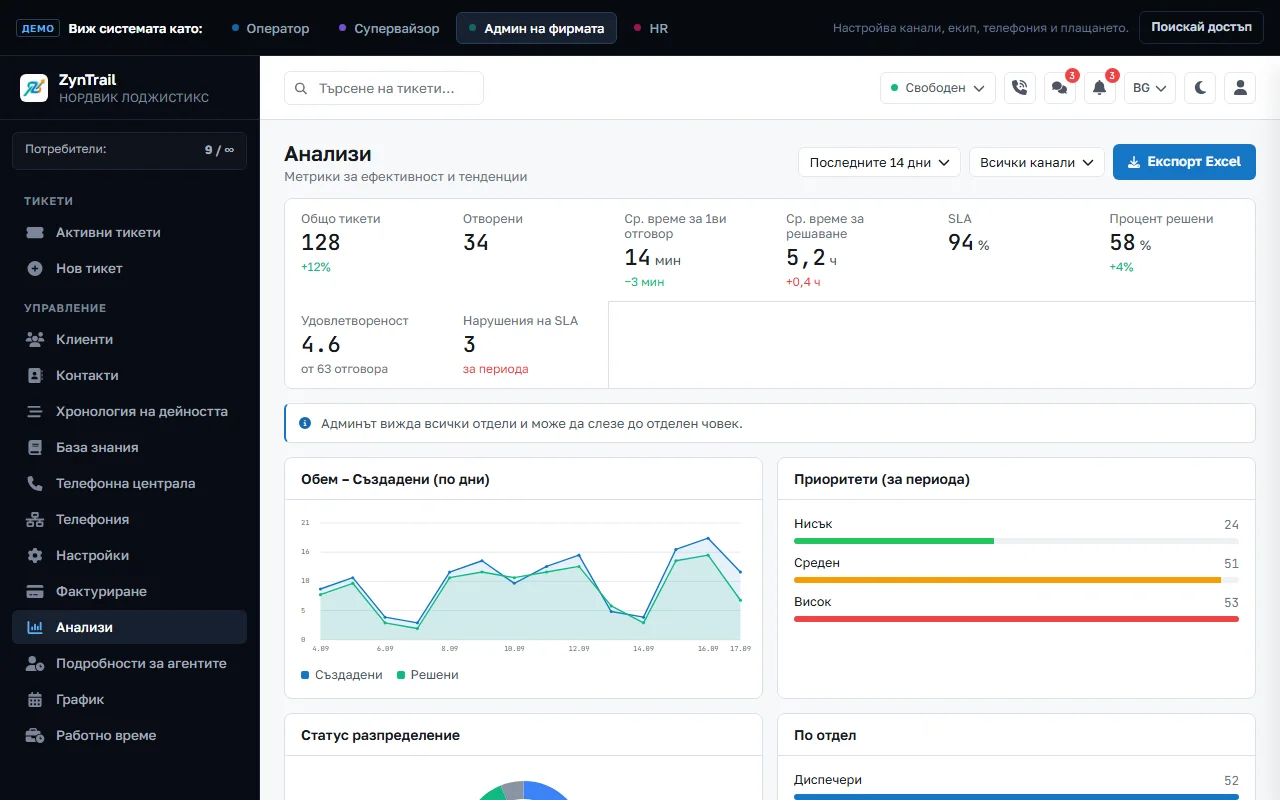
A sample company on the product’s screens: tickets, customers, telephony, the knowledge base and work time. Switch roles from the bar at the top and see what the operator, the supervisor, the admin and HR each see.
The demo is in Bulgarian. ZynTrail itself also works in English and Russian.
Around the ticket
-
Knowledge base
Articles your team writes for itself and finds with search while replying.
-
Document vault
Your terms, price lists and manuals. The assistant searches exactly these and answers from what it finds, instead of making things up.
-
Internal chat
Group and one-to-one conversations for the team, in the same window as the tickets. A question to a colleague doesn’t move to another app.
-
Shifts and work time
Who’s on shift, who’s on leave and how long everyone has worked. HR runs the schedule without access to customers.
-
Reports
Volume by channel and status, resolution time, SLA breaches and results by agent.
-
An API for your systems
Your online shop, CRM or ERP can open tickets by itself, using your company’s API key.
Reports
The numbers that show what’s running late
Volume by channel and status, time to first reply and to resolution, SLA breaches and the load on each agent. Tickets, customers, contacts and schedules export to CSV, and customers to Excel as well.
- Requests by channel and by agent
- Time to first reply and to resolution
- SLA breaches
- Answered and missed calls
Who sees what
Three account roles and one department role — the same as in the demo. HR deliberately has no access to customers: whoever runs people’s schedules doesn’t need to read their conversations.
| Tickets | Customers | Settings | Shifts | |
|---|---|---|---|---|
| Company admin | Included | Included | Included | Included |
| Supervisor | all | Included | Not included | approves leave |
| Operator | own departments | Included | Not included | own |
| HR | if permitted | Not included | Not included | Included |
A supervisor isn’t a separate kind of account but an operator with a department role: they see every ticket and approve leave. Separately, there is our own service account for running the platform — it’s used to create, suspend or restore a company, and it belongs to no company.
See how it would work for your team
Tell us how many people answer customers and how your customers reach you. We’ll show you the screens your team would work in — with your own cases, not a made-up script.
Start with 30 days free — every feature, nothing to pay up front.