
A softphone in the browser
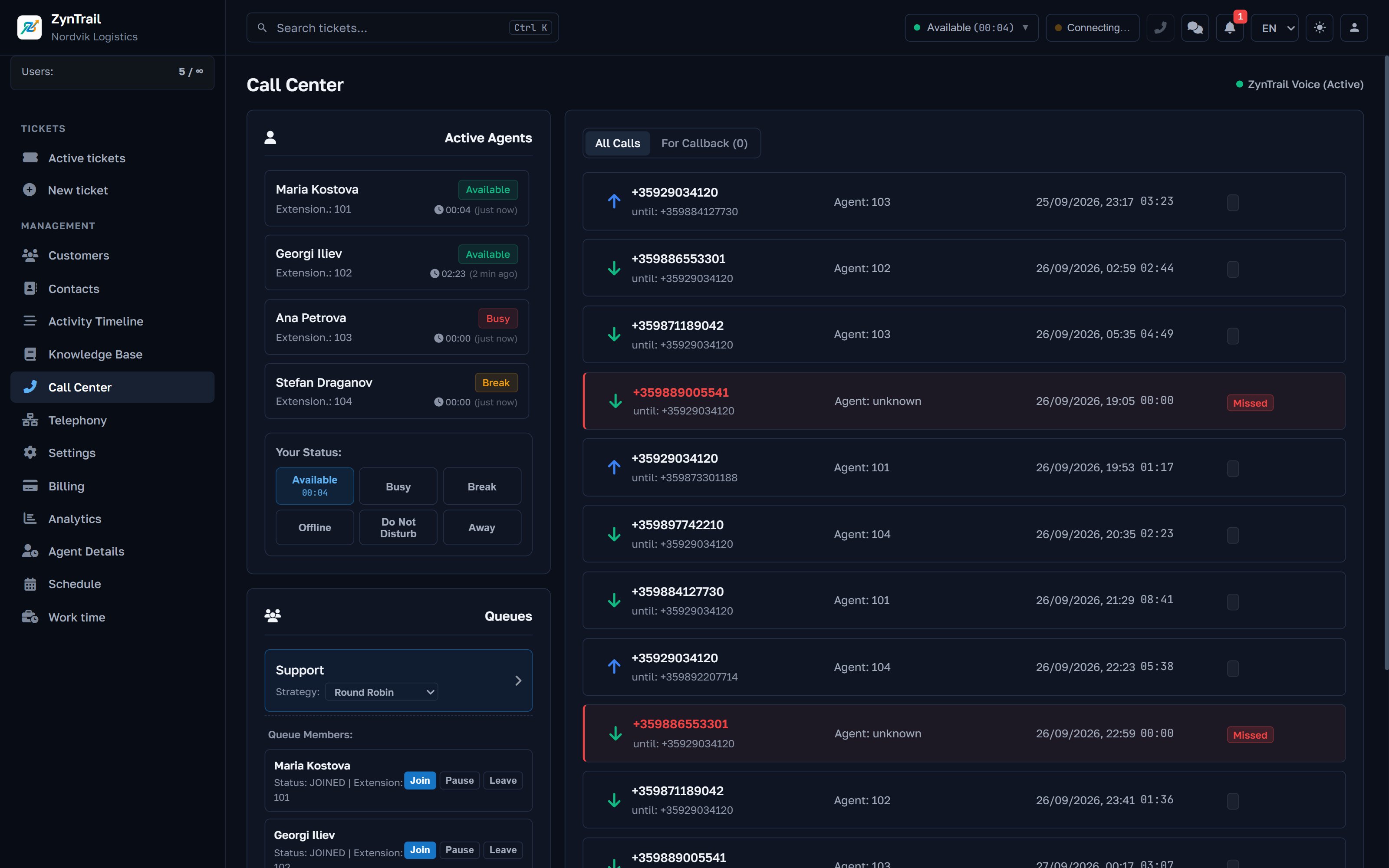
Take and make calls in the same window as the tickets, with hold and mute. Transfers are consulted: you speak to the colleague first, then complete the transfer or cancel it.
Telephony
ZynTrail Voice is our own cloud PBX, managed from inside ZynTrail. Your team answers and transfers calls in the browser, and every call is saved in the customer's timeline next to their emails.
Telephony is part of the Business, Pro and Enterprise plans.
Calls and tickets
Missed calls included. A call nobody answered becomes a ticket too, so you can see who rang.
If someone rings twice and gets through on the second attempt, you get two tickets. You can join them with ticket merging and undo the merge if needed. Both tickets are kept, and one points to the other.
Features
Take and make calls in the same window as the tickets, with hold and mute. Transfers are consulted: you speak to the colleague first, then complete the transfer or cancel it.
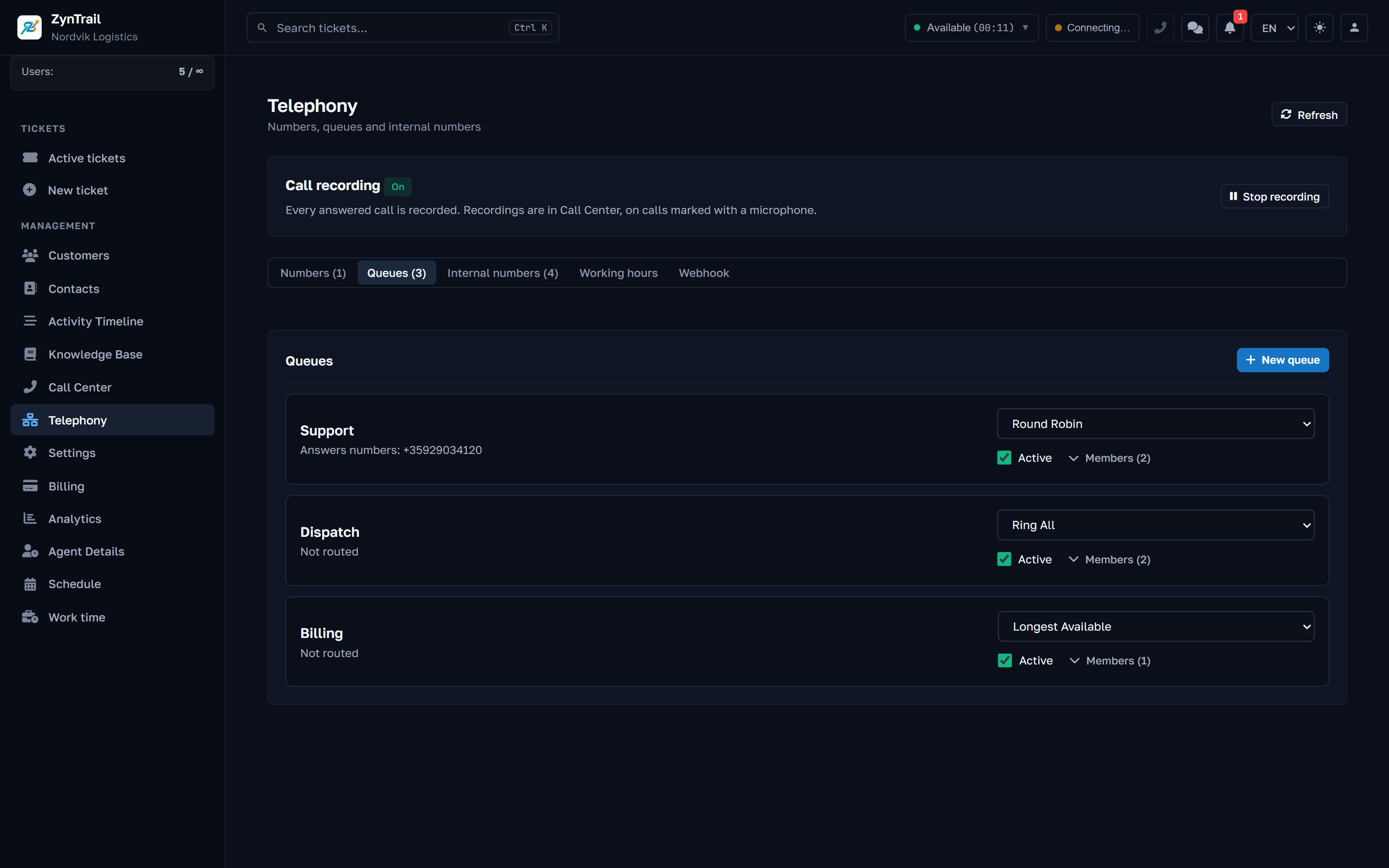
A group of agents answering one number. A call can ring everyone at once, go round in turn, or go to whoever has been free longest.
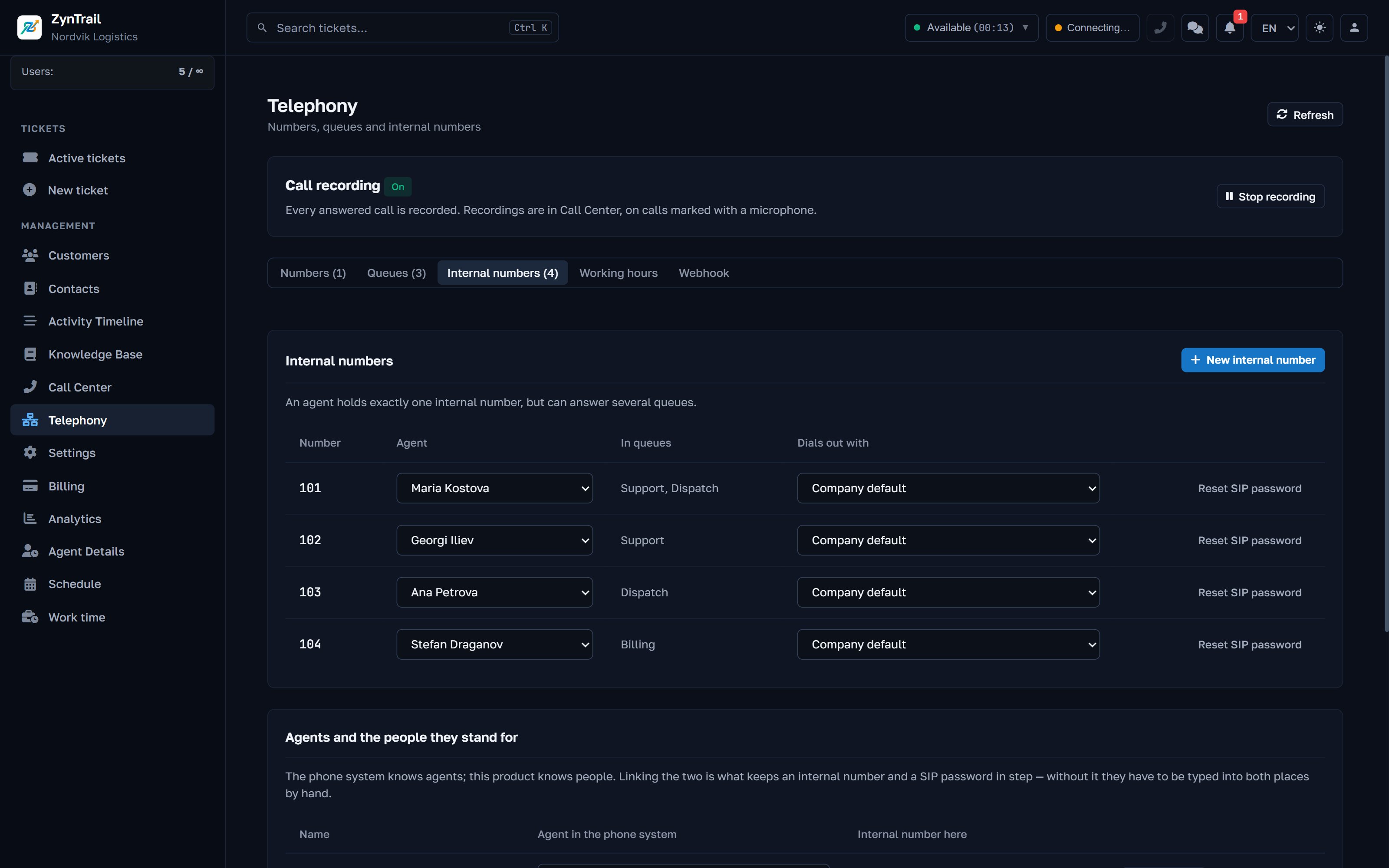
Each person has one extension, and the exchange enforces it. A transfer always reaches the right person.
You decide where each number goes: to one queue or to one extension.
Set a weekly schedule and holidays once. Outside those hours the caller hears that you are closed, and the call still opens a ticket marked as out of hours.
You decide whether calls are recorded. Recordings stay in the exchange and play through ZynTrail, so your telephony credentials never reach the browser.
For agents
The call centre software in ZynTrail: what agents see while the phone rings and what stays after the call. All of it comes with the Business, Pro and Enterprise plans.
A pop-up shows the caller's name, company, VIP mark and number of open tickets, matched to your customers by phone number. Answer, reject or create a ticket from it.
Dial from a customer's or contact's number, from Ctrl+K or from the dial pad. Call from a ticket and the call is filed back onto that ticket.
A card appears with two buttons: call the number back or create a ticket. The call has already opened its own ticket.
Available, busy, break, lunch, meeting or offline. The status carries over to the phone queues and is used when tickets are assigned.
Agents with their status and how long they have been in it, queues you join, pause or leave, and the call history with search. Each call opens with its routing, transfers, event log and recording, to play or download.
Inbound, answered and missed calls, talk time, average length, calls per day, and a table for each agent.
Connection
Either way, we do the setup together with you.
You keep your numbers and your contract. We connect the exchange to your operator over a SIP trunk and help with the setup. You pay for calls to your operator, as you do now.
A SIP trunk from your operator, or call forwarding to the phone system. If you are not sure what to ask your operator for, we will help.
The Telephony screen
The numbers come from your own operator. You set up the rest yourself on this screen: who answers each number, your business hours and holidays, each agent's extension and the number they dial out with. With the Webhook tab, each call becomes a ticket as soon as it ends.
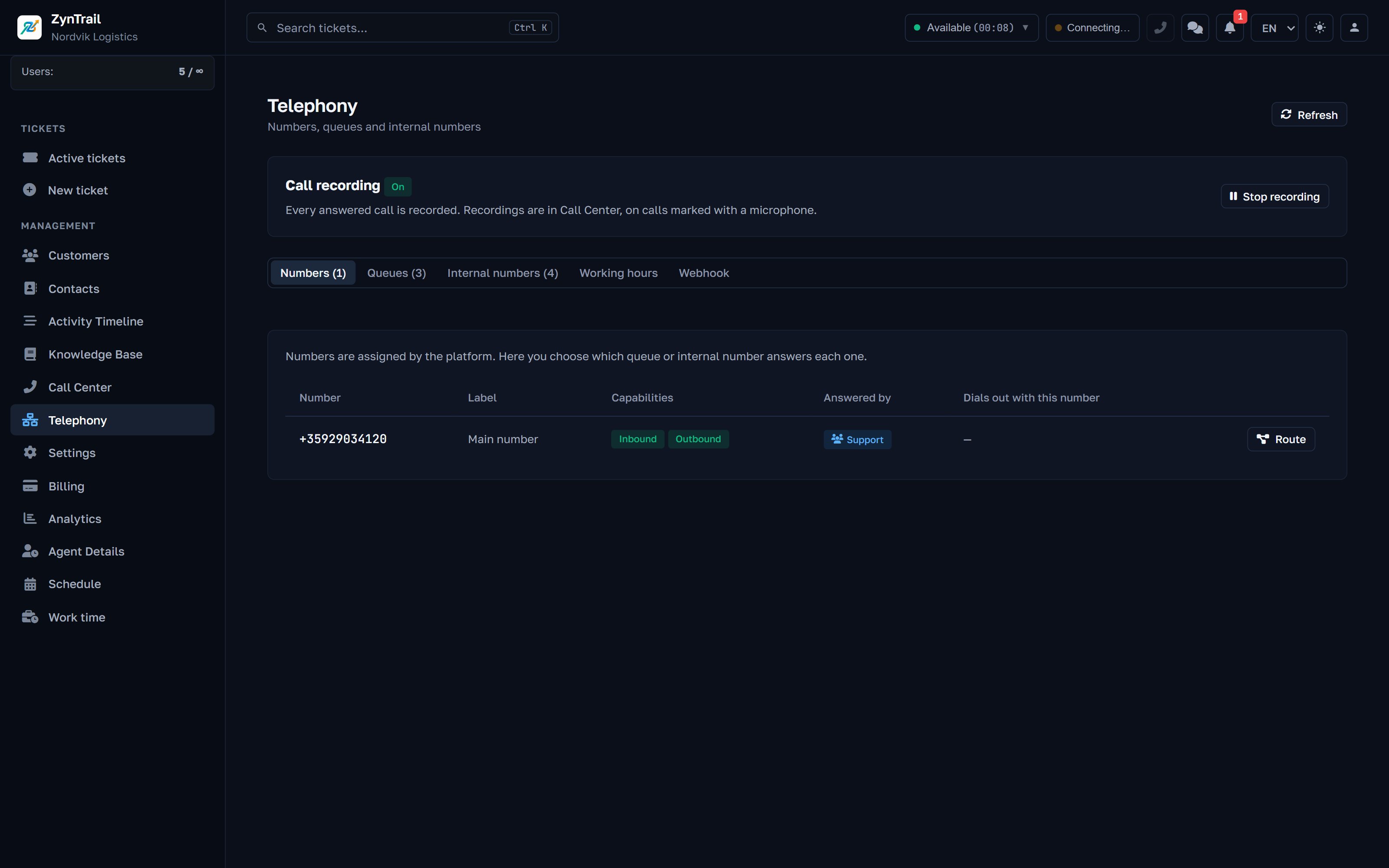
Which number goes to which queue or extension. Each number has exactly one route.
How it works
It follows the route you set: this number goes to this queue or this extension.
The exchange reports the call straight away. If that report gets lost, ZynTrail picks the call up on its next regular check.
Even if the exchange reports a call twice, it shows up in ZynTrail as one call.
When the call ends, answered or missed, ZynTrail opens a ticket. The call and its duration go into the customer timeline, with the recording if the call was answered and you record calls.
By phone, by email or on the channel the customer prefers, all in the same ticket.
Specifications
Twilio
You can connect telephony in two ways. Everything above describes ZynTrail Voice, our own exchange: queues, extensions, routes, business hours and holidays are managed from inside ZynTrail, calls become tickets, and the backup event channel keeps calls from going missing.
Twilio is offered only to companies that already use it. The softphone works, recordings go into the timeline and inbound calls open tickets. Hold and consulted transfer are part of ZynTrail Voice.
FAQ
No. Your numbers stay with your operator and reach the exchange over a SIP trunk or by forwarding. Customers keep dialling the numbers they always have.
A browser, a headset and a reasonable internet connection. The softphone runs in the same window as the tickets. Desk phones work as well: they register with the exchange like any other extension.
The caller hears that you are closed. The call is still logged as out of hours and opens its own ticket, so the next morning somebody can see who rang. Holidays are set separately from the weekly schedule and work the same way.
In the exchange. When someone wants to hear one, ZynTrail fetches it over its own connection, so your telephony credentials never reach a browser.
For 90 days, after which they are deleted automatically. If you need a different period, we set it for your company.
Yes. Every inbound call opens its own ticket, whether it was answered, missed or came in outside business hours. The ticket is filed under the contact whose number matches, and agents also see a missed-call card with buttons to call back or create a ticket.
Calls are recorded if you switch recording on; your company turns it on and off itself. A recording can be played on the customer's timeline, in their Calls tab and on the call centre board, and downloaded from there.
Yes. The softphone runs in the browser, in the same window as the tickets, with hold, mute and consulted transfer. You need a headset and a reasonable internet connection; desk phones can be added as extensions if you prefer them.
Tell us how many people answer customers and where your enquiries come from, and we will show you ZynTrail set up for a team like yours.
Every plan starts with a 30-day trial of the Pro features. Telephony is part of the trial with your own operator, and we help you set it up.