
A ticket in your queue
The conversation lands in the same queue as email, Messenger, Instagram and WhatsApp, with a chat icon so you can tell where it came from.
Website chat
A chat window for your own website, answered by your team from ZynTrail. Every conversation becomes a ticket in the same queue as email, Messenger and WhatsApp, so a question typed on your site is handled like any other enquiry. You add it with one snippet of code, and it comes with every plan.
Included in every plan.
On your site
A small chat window in the corner of your pages. The visitor types a question and gets an answer from a person on your team, without leaving the page they were reading.
Behind the window
For the people answering, a website chat is one more ticket in the queue they already work from. There is no separate chat console to keep an eye on.
The conversation lands in the same queue as email, Messenger, Instagram and WhatsApp, with a chat icon so you can tell where it came from.
Once the ticket is linked to a customer, the chat sits on their timeline next to their calls and emails.
If the visitor writes again after their ticket was solved, a new ticket opens. Last month's closed case stays closed.
Type “/” for a saved reply, and send files from the ticket, the same way you would answer an email.
A new conversation shows in the bell. The agent it is assigned to also gets a lock-screen notification if they use the app on their phone. Telegram alerts on Business and up, WhatsApp alerts on Pro and up.
In automatic mode, the AI assistant can answer by itself in the hours you set, at night for example. Pro and Enterprise.
Setting it up
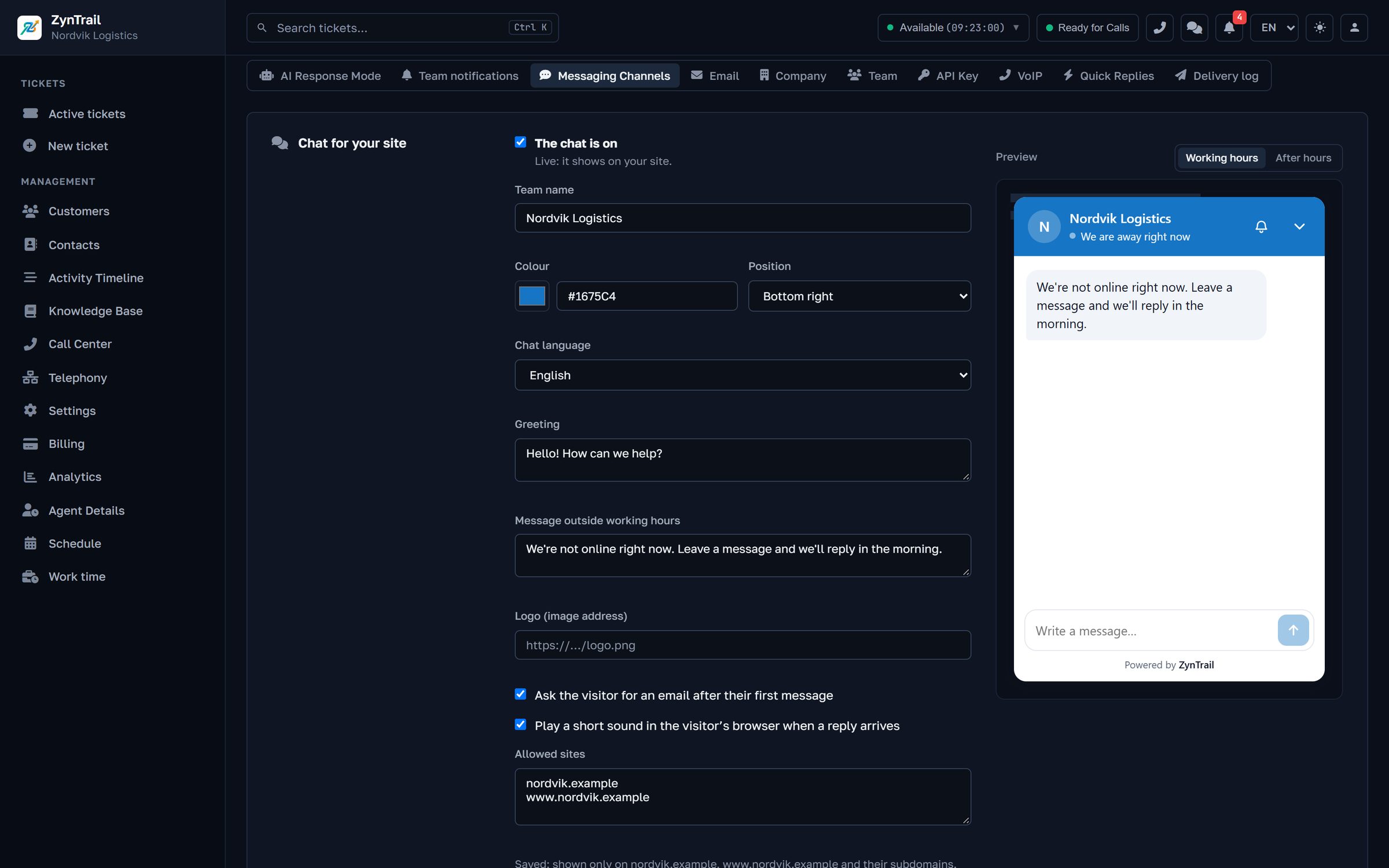
One piece of code, pasted once into your site's template or the custom-code field of your site builder.
Colour, left or right position, language, team name, logo, greeting, offline message, whether to ask for an email address, and sound.
Enter the domains the chat is allowed on, up to 20.
The settings page shows the window as visitors will see it. If the snippet ever turns up somewhere it should not be, issue a new key.
In figures
Before you write to us
No. You paste one snippet into your site's code, or into the custom-code field of your site builder, once.
Outside business hours the visitor sees your offline message and can leave an email address. The conversation is a ticket either way, so it is waiting in the queue in the morning. On Pro and Enterprise the AI assistant can answer in the hours you allow.
Every plan, from Start at €35 a month.
It runs on the domains you list, up to 20.
Yes. The first reply carries a personal link to the ticket. It works for 30 days, needs no account, and the visitor can reply from it.
Tell us how many people answer customers and which channels your enquiries come in on. We will walk you through the screens your team would actually use, with your own case in place of a demo script.
Every plan starts with a 30-day trial of the Pro features, which is everything except telephony.